
How do I access my Slingshot modem?
This page will assist you in understanding how to remote access your Slingshot modem.
Intro
You can manage your Slingshot modem's settings by accessing your modem interface. This is useful if you want to change your Wi-Fi's name and password, create a shared network drive, or add a VPN.
If you're using your own modem, please see setting up a non-Slingshot supplied modem.
Steps to accessing your Slingshot modem interface
- Identify your Slingshot modem below and note the login details.
- Open an Internet browser and enter the default gateway address (e.g. 192.168.1.1).
- Enter the username and password and you should be in!
If you're unable to log in, you'll need to factory reset your modem.
Netcomm NF18AC

Type: Fibre
Default Gateway: 192.168.1.1
Username: admin
Password: last 6 characters of MAC Address (lowercase)
Netgear Orbi Wi-Fi 6
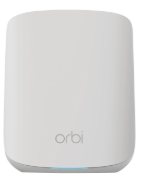
Type: Fibre
Default Gateway: 192.168.1.1
Username: admin
Password: password
Netcomm NF4V

Type: ADSL/VDSL/Fibre
Default Gateway: 192.168.1.1
Username: admin
Password: last 6 characters of MAC Address (lowercase)
Huawei B535-232

Type: Wireless Broadband
Default Gateway: 192.168.8.1
Username: admin
Password: admin
Netcomm NB604N

Type: ADSL
Default Gateway: 192.168.1.1
Username: admin
Password: last 6 characters of MAC Address (lowercase)
Fritzbox 7490

Type: Fibre
Default Gateway: 192.168.1.1
Username: User defined on first login
Password: none