
Setting up Roaming
If you want to use the internet while overseas, you will need to make sure that your Mobile Data and Data Roaming are both switched on.
Setting up roaming
Below are instructions on how to set up roaming for both Android and Apple phones.
Note: This may change from time to time as companies release new UI updates.
Android
- In Settings, click on Connections.

- Then click on Mobile Networks.

- Then switch on Data Roaming. (This will only pop up when you are overseas).

- Swipe down the menu panel and make sure Mobile Data is on.

Apple iOS
- In Settings, click on Mobile.

- Then make sure Mobile Data is switched on.
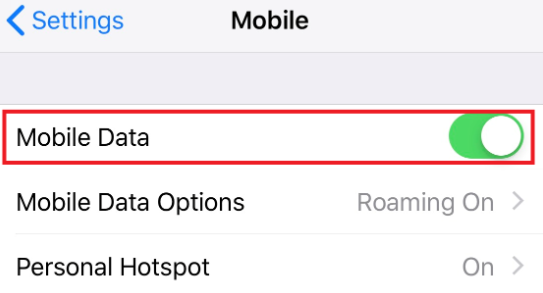
- Then click on Mobile Data Options.

- Then click on Data Roaming.

Once you have enabled the mobile settings, it will automatically search for a suitable GSM network to connect to. Please note this may take a few minutes.
Rates will depend on the local carrier of the destination you are visiting.
For information on how to purchase these roaming add-ons, please visit the following FAQ here.
Roaming with VoLTE
Because Slingshot Mobile is powered by the 2degrees network, when you now roam in countries where 2G and 3G has been switched off, you will need a to ensure the following:
- You have an eligible Slingshot Mobile plan
- You have confirmed your destination is VoLTE roaming-enabled
- You have a VoLTE roaming capable device
- You have enabled mobile data and VoLTE on your device settings.
While not all destinations have established their VoLTE networks yet, many networks are constantly being updated and improved.
Once you have enabled the mobile settings, it will automatically search for a suitable GSM network to connect to. Please note this may take a few minutes.
Rates will depend on the local carrier of the destination you are visiting.
For information on how to purchase these roaming add-ons, please visit the following FAQ here.