
Where to place your modem for best Wi-Fi
This page will assist you in understanding where to place your modem correctly in order to get the best Wi-Fi across your household.
Overview
The most important factor affecting Wi-Fi performance in your home is modem placement. Re-positioning your Wi-Fi modem can make a huge difference to your internet experience.
Before you re-position your router, it’s good to understand what factors typically slow down your Wi-Fi. Check out How to fix slow Wi-Fi before you begin.
Wi-Fi related issues:
To quickly diagnose and potentially resolve your broadband issue, we recommend using the network scanning feature in your Slingshot app. This tool can identify and fix common Wi-Fi related issues without the need to speak to a specialist. To access the app, search for Slingshot in your app store.
Tips to improve your Wi-Fi
- Don’t keep your modem in a cupboard or patch panel as the walls can block your modem's signal.
- Place your modem somewhere near the center of your house. You will have the best connection if your devices can see the modem.
- Make sure your modem is standing upright or is positioned the way it is intended – this allows Wi-Fi signals to transmit the best.
- Keep it away from the kitchen - some appliances such as microwaves can interfere with the signal.
Best place for your modem
A good rule of thumb is to place your modem in the room where you will be using Wi-Fi the most. Ensure it’s in the best location for your Wi-Fi needs:
- If gaming is most important to you, your modem is best placed in the same room as your PC or gaming console and connected to the modem via an Ethernet cable.
- If streaming via TV is most important, place your modem near your TV.
- If Wi-Fi coverage in the home is most important to you (including streaming video in all parts of your home), place your modem in a central location or by your TV with an additional mesh Wi-Fi system.
Best placement:
Best for general Wi-Fi coverage in the home
NF18 2.4Ghz

Poor placement:
Place your modem somewhere near the centre of your house to get the best coverage
NF18 2.4Ghz

Best placement:
Best for general Wi-Fi coverage in the home
NF18 5Ghz
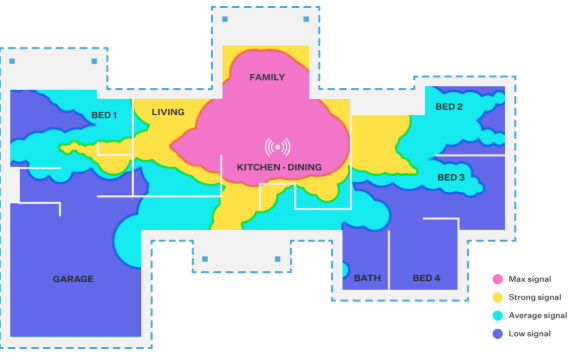
Poor placement:
Don’t keep your modem in a cupboard as the walls can block some of your router’s signal
NF18 5Ghz

Images are indicative of possible coverage with our NF18 Modem, but results within your own home may vary.
Still can't get a signal in every room?
While changing the positioning of your router can improve performance in certain environments, you will probably still have ‘dead zones’ in other rooms.
A single wireless access point will struggle to spread a strong signals to every room in the home, because of several factors such as the layout of your house, solid building materials, metal appliances, and interference from competing Wi-Fi networks.
You can see the limitations of Wi-Fi in your own home by walking around and measuring signal strength with apps like Wi-Fi Strength Meter or Wi-Fi Sweetspots.
Generally, the best solution to the poor range is to introduce more wireless access points.
A mesh network is the best solution for full wireless coverage. Mesh networks work independently from your current modem and use multiple Wi-Fi points to spread a strong signal to every room. Get in touch with us to discuss options!